Collect RFID reader TID/EPC data and transfer it to database My SQL/SQL Server Network/Serial Port Zhihu
As a professional provider of IoT data acquisition solutions and an expert in industrial IoT data acquisition, the editor of Shanghai Data Acquisition IOT Technology Co., Ltd, (daq-iot) hereby presents the following introduction, and sincerely welcomes discussions and exchanges. Supported Communication Interfaces: CAN, RS485, Mbus, 4–20mA, Profibus, CC-Link, HART, digital I/O, etc. Industrial Protocols: Modbus RTU/TCP, HJ212, IEC104, DLT645, DLMS, IEC61850, MQTT, etc. Mail:export@daq-iot.com
Requirement background:
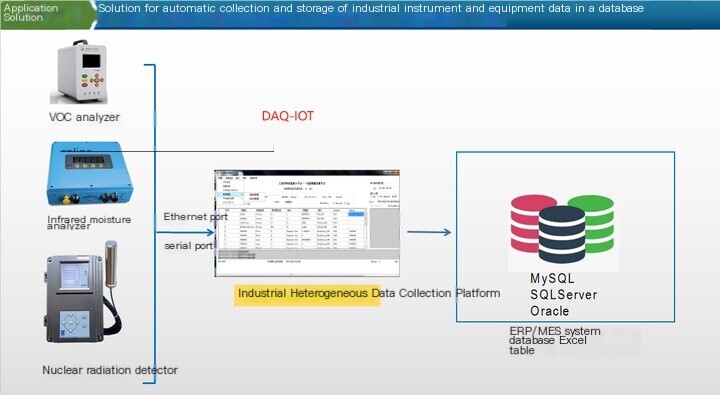
Collecting RFID reader readingsTIDAnd EPC, as well as trigger time, data storage in the database SQL ServerAs long as there is new data triggering, it will be collected internally
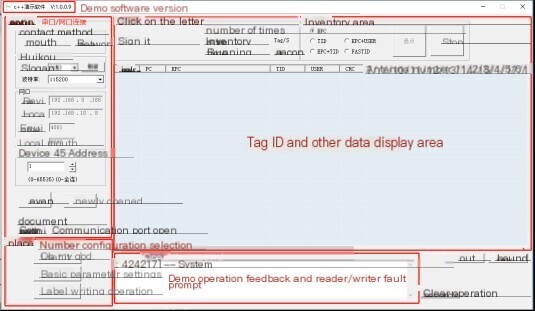
Serial port connection only requires configuring the above parameters
1. Click to select serial port
2. Select the serial port number (please confirm on the computer whether the COM port number is correct. If the correct serial port number is not displayed, you can click the [Refresh] button)
3. Select baud rate: default is 115200 (if the parameter has been modified, select the corresponding parameter, otherwise the connection cannot be made)
4. Select equipment485 Address: Default is 1
Equipment 485 Address Description: The address code can be modified in the basic parameter setting interface, with a range of decimal numbers 0-65535; If the parameters have been modified, the corresponding parameters need to be filled in, otherwise the connection cannot be made; If you forget the address code, you can enter the address code as 0, 0 can be connected)
5. Click the [Connect] button to bring up a prompt interface:
If the version number read from the device Firmware matches the version number displayed in the Firmware area, then the connection is successful
If the pop-up interface prompts: Connection failed, ff,fe, If the 485 address is entered incorrectly, click the [Confirm] button, then [Disconnect] the connection again, enter the correct 485 address code, and then [Connect] again. If you forget the 485 address code, you can enter [0]
Network port connection
Only the above parameters need to be configured for network connection
1. Click to select the network port
2. Factory IP address of the reader/writer: default 192.168.0.188,
Note:
To connect to the network port, the local IP address needs to be changed to the IP address of the same network segment as the device:192.168.0.XXXXxx is between 1-255 and cannot be 188
4.1 Inventory
4.2 Stop inventory
4.3 Querying the RF parameters of the reader/writer
4.4 Set the RF parameters of the reader/writer
4.5 Writing and Reading Labels
4.6 Query the working mode of the reader/writer
4.7 Set the working mode of the reader/writer
4.8 QueryWiegand output modeBelow are the parameters
4.9 Set parameters in Wiegand output mode
4.10 Reader frequency setting
4.11 Lock Label
4.12 Inactivation label
4.13 Query version number
4.14 Query device code
4.15 Querying chip temperature
4.16 Turn on and off the buzzer
4.17 Query RS485 address
4.18 RS485 address
4.19 Query serial port baud rate
4.20 Set the serial port baud rate
4.21 Query relay parameters
4.22 Set relay parameters
4.23 Restore factory settings
The main requirement is for the product to be identifiable after leaving the factory, and to be able to confirm whether it is RITZ productsThe considered solution is to implant RFID chips inside the product and engrave QR codes on the outside of the product
In the future, it is possible to integrate RFID into the product and consider collecting this information to achieve automatic reporting of key processes, thereby achieving process data informatization that can be viewed and retrieved at any time.


评论
发表评论