IoT Equipment Status Monitoring Smart Well Cover Street Lamp Management Platform
As a professional provider of IoT data acquisition solutions and an expert in industrial IoT data acquisition, the editor of Shanghai Data Acquisition IOT Technology Co., Ltd, (daq-iot) hereby presents the following introduction, and sincerely welcomes discussions and exchanges. Supported Communication Interfaces: CAN, RS485, Mbus, 4–20mA, Profibus, CC-Link, HART, digital I/O, etc. Industrial Protocols: Modbus RTU/TCP, HJ212, IEC104, DLT645, DLMS, IEC61850, MQTT, etc. Mail:export@daq-iot.com
asIoTData Acquisitionsolution is a professional provider, and Daq iot, the editor of IoT, would like to introduce the following content here. We sincerely welcome everyone to discuss and exchange ideas.
As a professional provider of IoT data collection solutions, daq-iot, the data acquisition and IoT editor, will introduce the following content here and sincerely welcome everyone to discuss and communicate. Author: DAQ-IoT Data Acquisition IoT Building Energy Monitoring System Data Acquisition - Smart Energy Management Building Energy Efficiency Source: Bilibili
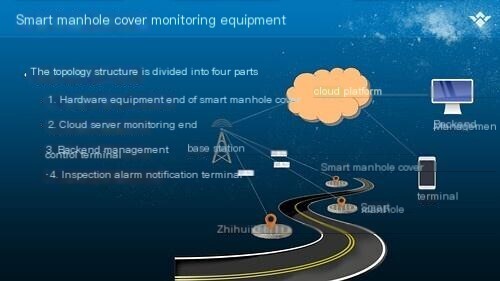
- Introduction to Basic Platform Functions
- Equipment status monitoring:The device backend can monitor and display the status information of front-end devices 24 hours a day. When the status value detected by the front-end device exceeds the preset threshold, a warning message will be prompted and reported to the central platform. At the same time, the device has a heartbeat function and can report status information to the background every 24 hours, including battery level information and device signal strength. This is used to determine whether the device is operating normally.
- Remote Monitoring:The system backend can Real-time monitor the status information of all branches in the city, and alert points with abnormal data by sending messages through PC pop ups or mobile apps (WeChat mini programs).
- alarm handling:The system will Real-time monitor abnormal data information of equipment installation points (abnormal opening, displacement, tilting of manhole covers, loss of equipment information, low voltage, environmental temperature, water temperature, water quality pH value, water level, combustible gas concentration, fire, etc.), and promptly generate alarm messages for abnormal data situations. The information will be notified to the corresponding responsible persons through PC pop ups, mobile apps (WeChat mini programs), and other means.
- Construction authorization:In the actual process of O&M, there may be false alarms of intelligent manhole covers Sensor during employee construction. In response to this phenomenon, we can authorize processing through the backend. The manhole covers authorized for construction will not be alarmed, but a construction record will be generated for easy recording of construction status and future data queries, better managing our manhole covers.
- Permission Management:The system can define and allocate permissions and supervise different users and user groups, and can also create or delete users and user groups. There is no limit to the number of users.
- System Data Analytics:Through the information collected by the system, the backend can also process and develop theData Analyticssystem according to customer needs. For example, it can analyze the concentration of combustible gases in underground pipelines, equipment failure rate, groundwater level, flow rate, etc. in a certain area during a certain period of time, and automatically generate charts for investigation, analysis, and judgment.
- Platform Function Module Requirements Specification
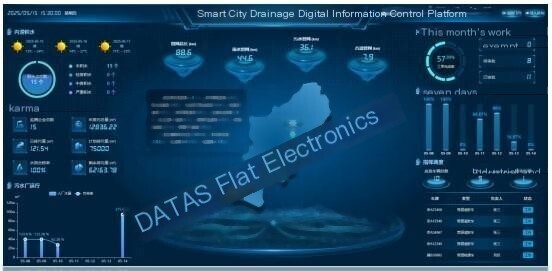
- Large screen display board
The cockpit style large screen display panel displays statistical analysis information for the current mechanism (including its sub mechanisms):
- The left side displays the current number of intelligent device types and a list of all device statuses for the institution;
- In the middleGIS mapDisplay the geographical location information of all devices located in the center of the current institution, and display the current device status information in different colored icons (green: normal, red: alarm, gray: offline). When hovering over the icon, display the selected device name (number) and status. Click on the icon (or device in the list) to display all information of the device (including basic information, installation information, unlock records, report records, etc.), and the middle map will enlarge to display the geographical location information of the device. The map supports filtering by device type, device status, basic device information, and other options. It also supports map thumbnail, zoom in, zoom out, and pan operations.
- On the right side, display the operating status of all equipment in the institution in the form of a statistical chart (including the proportion of alarm types, offline statistics).
- System Administration
System management includes institutional management, role management, user management, and system configuration:
- Institutional management:Design the organization in a tree structure, allowing for unlimited downward extension of sub organizations. Authorized personnel can perform tree operations on the organization, including merging, revoking, migrating, parent-child association, and cancellation.
- Role management:You can add (modify, delete) a certain role to this institution or all institutions, and assign functions and buttons to that role
- User management:Can manage users in this institution and its subsidiaries (add, delete, modify, reset passwords)
- System configuration:When the system is deployed independently for customers, it can be configured (including system name, customer name, logo, and display center position on GIS map).
InDevice Management, first add products to this institution or its subsidiaries, and then add corresponding devices to the corresponding product types. The equipment belongs to the product, and the product belongs to the organization. It is allowed to adjust the affiliation between the product and the equipment.
- Product Management:Management personnel can manage products under their organization and its subsidiaries through product management functions (including adding, modifying, and deleting), and can define physical models, transfer Protocol selections, and migrate affiliated organizations for such products.
- Device Management:Devices are bound to products, and different types of devices are bound to different product types. In Device Management, a list of all devices in the current institution's products and selected products is displayed. Click on the device row to navigate to the device information interface and display detailed information about the device. It can perform functions such as adding, deleting, modifying, querying, enabling, disabling, and batch operations on the device (including setting all threshold values for the device (for special situations, it can also be considered to add setting functions for construction personnel on the APP (mini program) end), geographic location information, affiliated institutions, products, etc.).
- Device Information:The left side displays a list of products under the current organization and a list of all devices in the selected products. After clicking on a device in the left list, the right side displays detailed information about the device (including its status, unlocking records, reporting records, installation information, inspection information, and map trajectory). Specific devices can also be retrieved by device number, name, etc.
- Device disarming:Through device disarming management, single devices or device groups can be disarmed by institution, product, or device. During the disarming period, the device cannot be interrupted or triggered.
- Equipment inspection:The information of individual devices or device groups that need to be inspected can be pushed to the inspection personnel. The inspection personnel can conduct on-site inspections as required and report the inspection results to the platform through the APP (mini program). The platform can query inspection records based on personnel and equipment.
- log management
- System log:Record user operation logs (including login information, operation information, etc.).
- Report logs:Record device reporting data information (including reporting type, device number, reporting time, product, institution, reporting content, device status, etc.).
- Unlock log:Record the operating time and unlocking records of the unlocking personnel.
- Introduction to the functions of the APP (mini program) end
This system's APP (mini program) supports Android and IOS terminals, as well as WEB backend management, and requires devices to be connected via Bluetooth near-field connection. Mainly used for equipment installation and debugging, on-site inspection, follow-up processing of alarm information, display of equipment network location, and navigation tracking.
The main implementation functions include:
- Bluetooth connection:On site personnel log in to the APP (mini program) and use Bluetooth near-field search to search for specified types of Bluetooth devices nearby. After connecting the devices, they perform relevant operations.
- Equipment installation:The registration and reporting of equipment installation points during the installation process. After testing and installing the equipment at a certain point, construction personnel can set and upload basic information such as the geographical location (GPS positioning), equipment installation information, parameter thresholds, and the unit to which the manhole cover belongs through a mobile app (mini program).
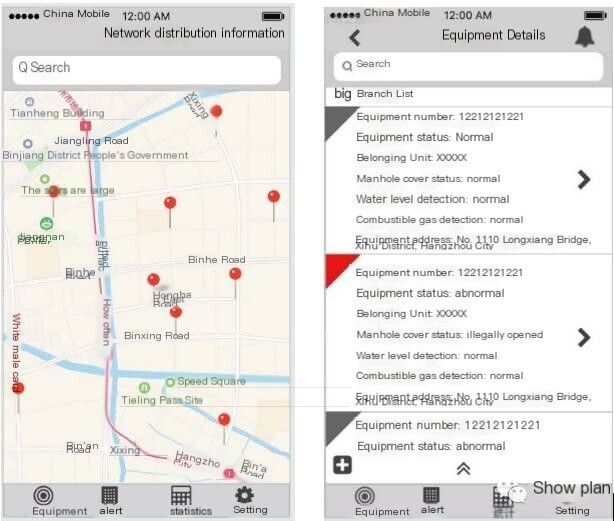
- Point status display:Display basic information such as data status, geographical location, and affiliated units for the equipment network, as shown in the interface below:
- Alarm trackingThe APP (mini program) can generate alarm notifications based on the alarm information generated by the WEB backend, and can report the on-site alarm situation to the backend in the form of text and photos.
- Accurate navigationThe APP (mini program) has both point positioning and navigation functions, and provides short distance precise positioning at close range, reducing the search difficulty for patrol personnel.
- Work order management:On site personnel can apply for disarming of individual devices or groups of devices, and after approval by the administrator, no interruption will be triggered during the effective period of the application. (Convenient for on-site equipment maintenance and other operations in the later stage).
- on-site inspectionThe form of the notification is shown in the following figure:
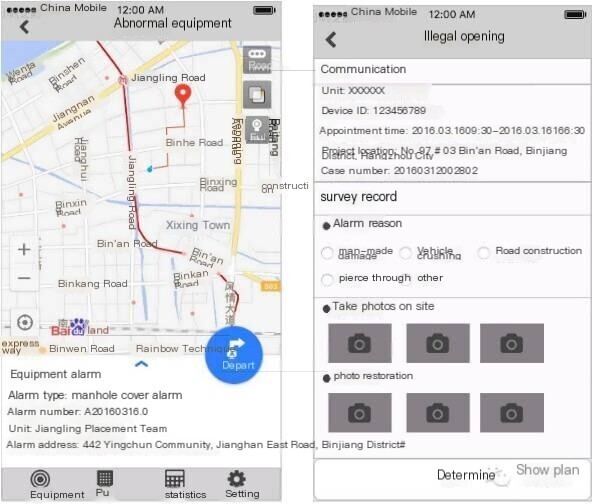
- There are also forms of this
- Related platform requirements
- The platform and server need to be able to switch
The platform and server may switch due to various reasons, such as malicious price increases or platform service suspensions. - Download function
The system has the function of downloading remote devices, including changing platforms and servers, downloading programs, updating programs, and so on. - Platforms and devices need to establish confidentiality measures
Platforms and devices need to establish anti cracking and anti intrusion measures to prevent peers from damaging and plagiarizing.


评论
发表评论