Distributed PV | State Grid PV Quad Device | Group Control and Adjustment AGC/AVC Equipment
As a professional provider of IoT data acquisition solutions and an expert in industrial IoT data acquisition, the editor of Shanghai Data Acquisition IOT Technology Co., Ltd, (daq-iot) hereby presents the following introduction, and sincerely welcomes discussions and exchanges. Supported Communication Interfaces: CAN, RS485, Mbus, 4–20mA, Profibus, CC-Link, HART, digital I/O, etc. Industrial Protocols: Modbus RTU/TCP, HJ212, IEC104, DLT645, DLMS, IEC61850, MQTT, etc. Mail:export@daq-iot.com
As a professional provider of IoT, Data Acquisition, and solution, Daq iot, the editor of IoT, would like to introduce the following content and sincerely welcome everyone to discuss and exchange ideas. As a professional provider of IoT data collection solutions, daq-iot, the data acquisition and IoT editor, will introduce the following content here and sincerely welcome everyone to discuss and communicate.
1 Product Overview
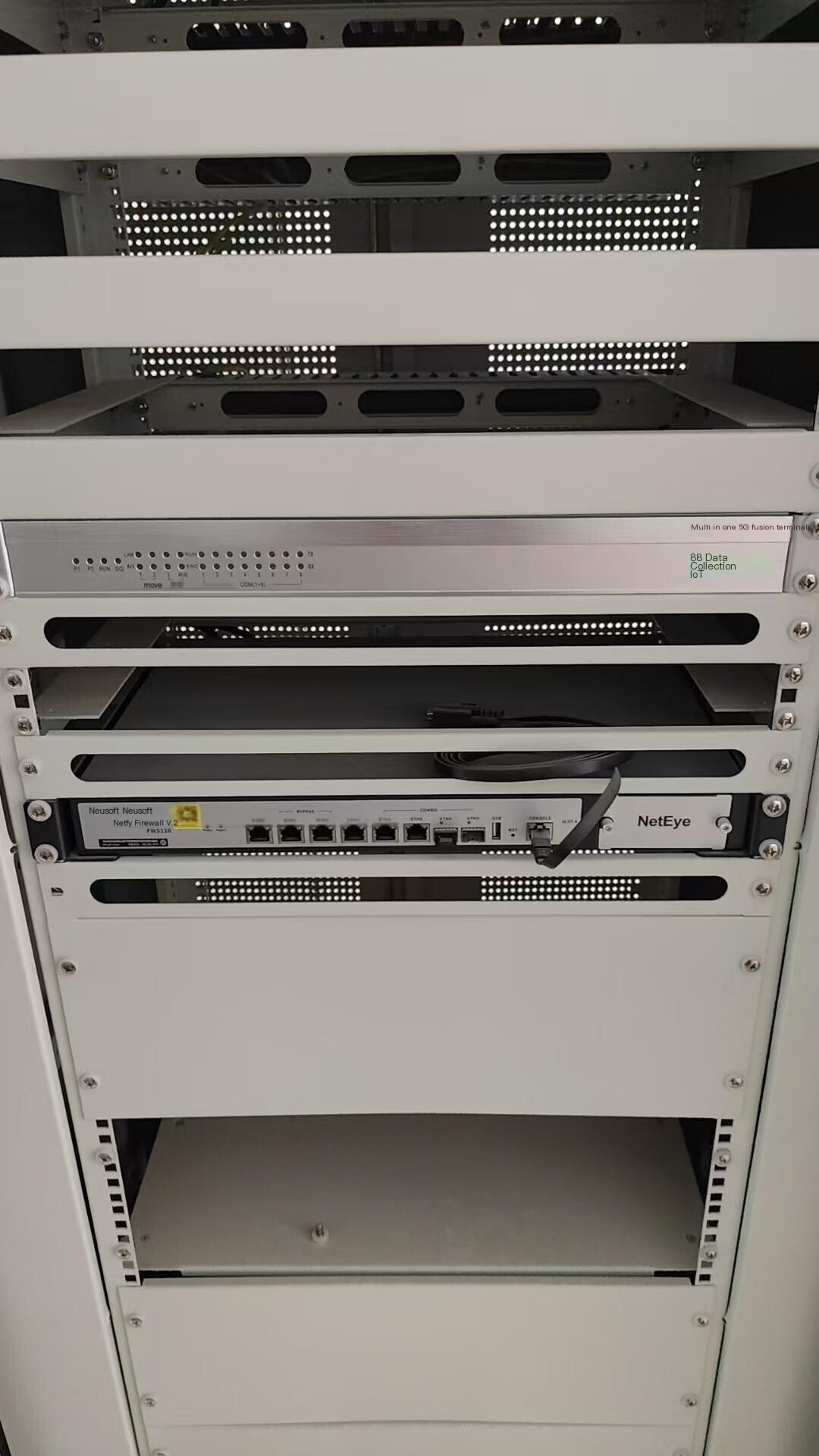
DAQ-GP-VCMT5GMulti in one 5G fusion terminalIt is a control terminal launched byShanghai DAQ-IoTNetwork Technology Co., Ltd., which integrates 5G communication, vertical encryption, remote communication, and AGC/AVC functions.
It adopts advanced embedded LINUX operating system and flexible modular design, adopting design concepts such as fanless, high performance, low power consumption, and flexible installation. From the perspectives of intensive deployment, equipment investment cost savings, and installation space savings, it is a multifunctional and integrated data collection and communication device that integrates 5G communication terminals, vertical encryption, remote motors, and AGC/AVC control functions. It meets the requirements of 380V, 10KV, and above distributed PV accessing the dispatch master station in a direct procurement manner, while also performing automatic power control functions. It adopts 5G wireless access to the grid as an important supplement to wired access, which can achieve unified dispatch of all local power plants and distributed PV by the power dispatch center, realize power system access of PV, and meet the requirements of distributed PV. The requirements of "observability, measurability, adjustability, and controllability".
2 Service Philosophy
Our company solemnly promises:
You are not only purchasing products, but also providing meticulous and thoughtful technical support services!!!( =^_^= )
This product only requires ordinary workers to connect and install it on site! No debugging required!
We provide free remote guidance, remote configuration and debugging services, and send data to the user's designated cloud platform.
Free consultation service forIoTsolution!
3 Core advantages of the product
- High performance embedded processor Cortex-A7800MHz, capable of processing up to 30000 measurement points withReal-time;
- 512MB memory, 8GB eMMC storage;
- Industrial grade design, operating temperature: -40~75 ℃;
- Hardwareand software dual watchdog ensure stable and reliable operation of the system;
- Supporting multiple industrial and power communication protocols, please refer to the "Multi in One 5G Fusion Terminal Protocol Library List" for details;
- Support local/remote visual management, communication debugging, control, etc;
- Support 5G communication, routing, VPN,NAT;
- Built in micro vertical encryption authentication module;
- Remote communication capability, supporting AGC/AVC control functions.
- Supports Edge Computing capability and supports Python secondary development.
- Support data storage and resume from storage breakpoints.
4 main functions
4.1 Data Acquisition
The product supports multiple types ofProtocoldevices, corresponding toProtocolsupporting over 300 types of communication including industrial, power, environmental protection, and other industriesMODBUS/CDT/101/102/103/104/IEC61850/GOOSE/DLT645/MQTT/HTTP, etc., meet various on-site needs. In the new energy industry, we have accumulated various inverter communication Protocol, supporting data reading, remote switching, remote adjustment of inverter active and reactive power, power factor, voltage regulation, etc.
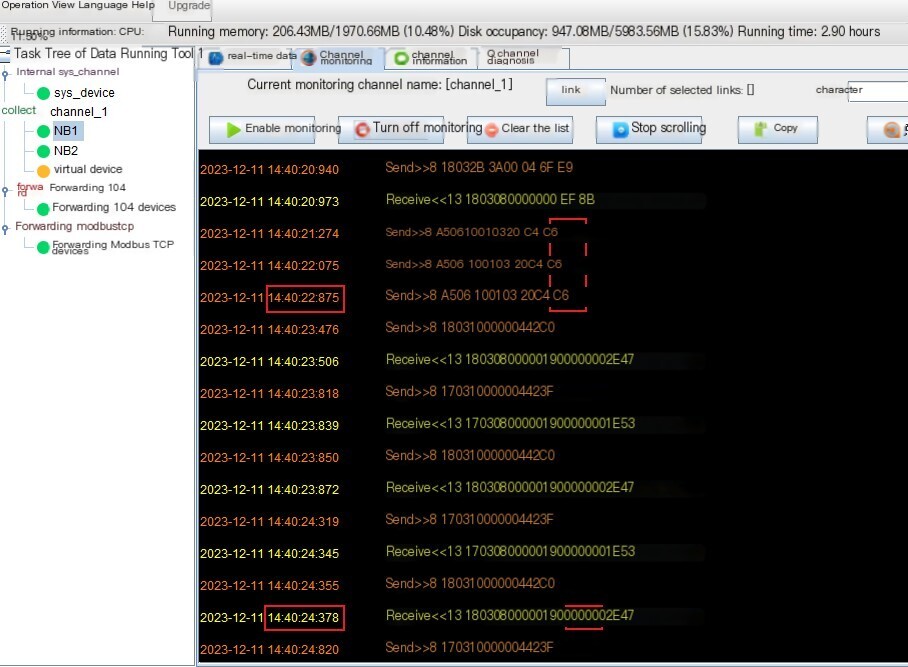
Image: Data Acquisition and Broadcast Remote Adjustment
4.2 Data Storage
Support data storage, the machine has 8GB of built-in storage space, which can meet various data storage needs, offline caching, breakpoint resume and other functions. It supports built-in applications for data storage and automatically replenishes offline data during transmission recovery.
4.3 Data Forwarding
The multi in one 5G fusion terminal itself has remote machine function, supporting various platforms/power dispatch 104, distribution network 101, CDT and other communication Protocol, supporting simultaneous transmission of multiple data channels, such as 101/104, and supporting single channel forwarding for multiple clients, meeting the communication needs of various dispatch master stations.
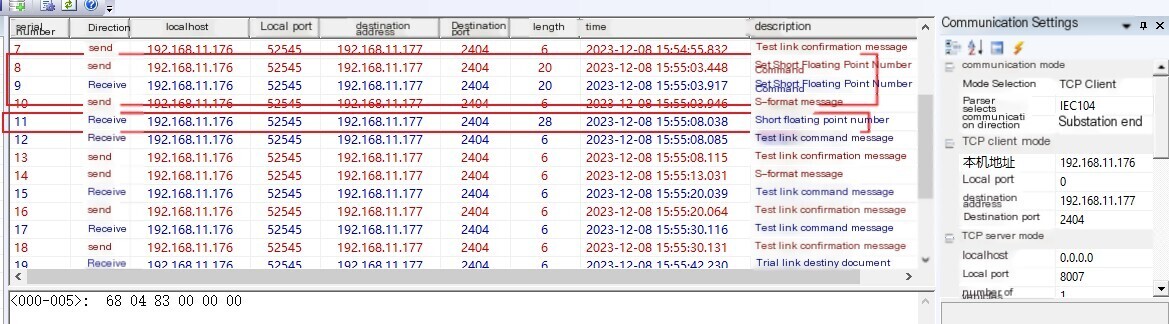
Image: 104 main station software collects and remotely adjusts 5G fusion terminal data
4.4 Encryption Transmission
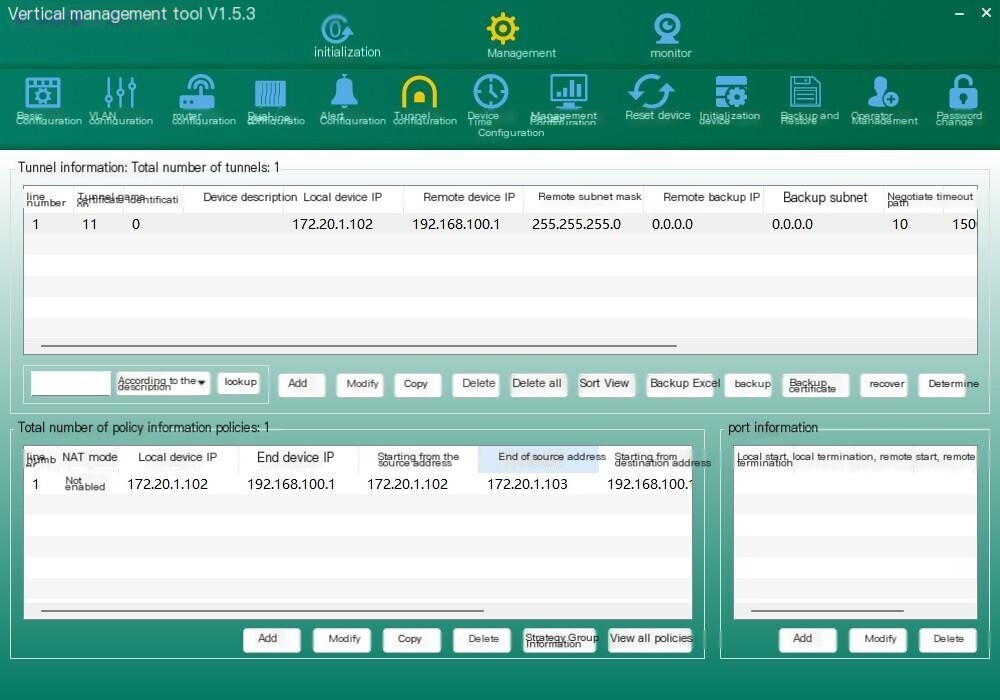
The multi in one 5G fusion terminal is equipped with a micro vertical encryption device, which encrypts and transmits data with the scheduling master station to ensure data security, reliable transmission, and seamless integration with various vertical encryption devices of the master station, such as Kedong and Nanrui.
Image: Kedong Encryption Configuration
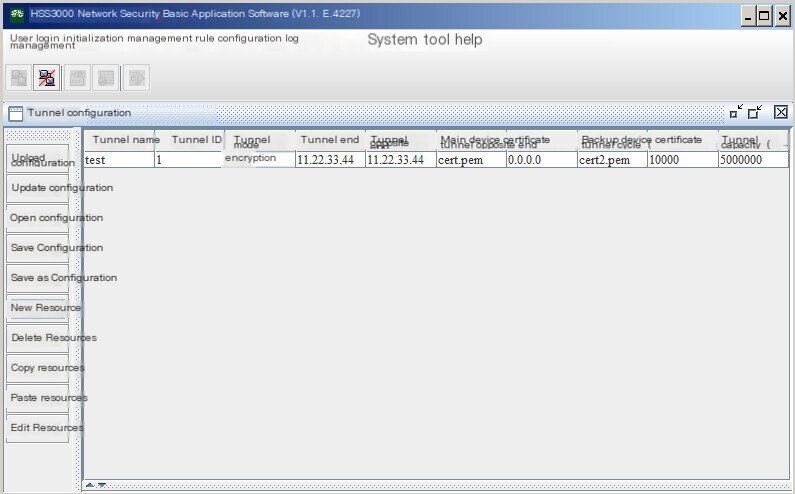
Image: NARI Encryption Configuration
4.5 AGC/AVC Control
The multi in one 5G fusion terminal supports comprehensive AGC/AVC control functions such as active power control regulation, reactive power control regulation, power factor regulation, and voltage regulation for dispatch and distribution. It responds quickly and automatically executes adjustments to maintain the target active, reactive, and voltage values issued by the main station. It is compatible with multiple types of inverter group control and regulation, reactive power compensation devices, and inverter reactive power Load Balancing, and supports multiple execution algorithms to meet the safe and stable operation needs of various power plants and stations.
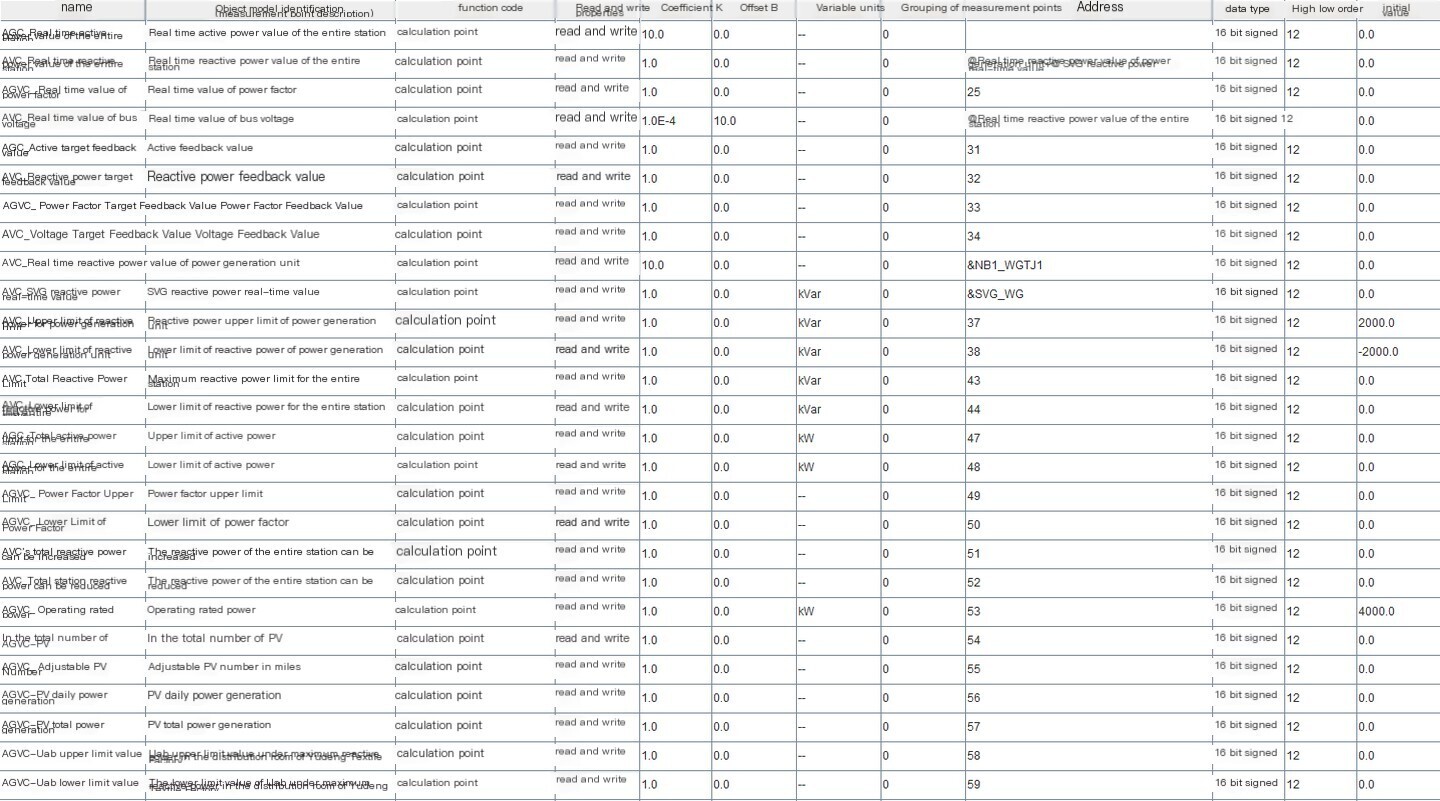
Figure AGC/AVC telemetry points
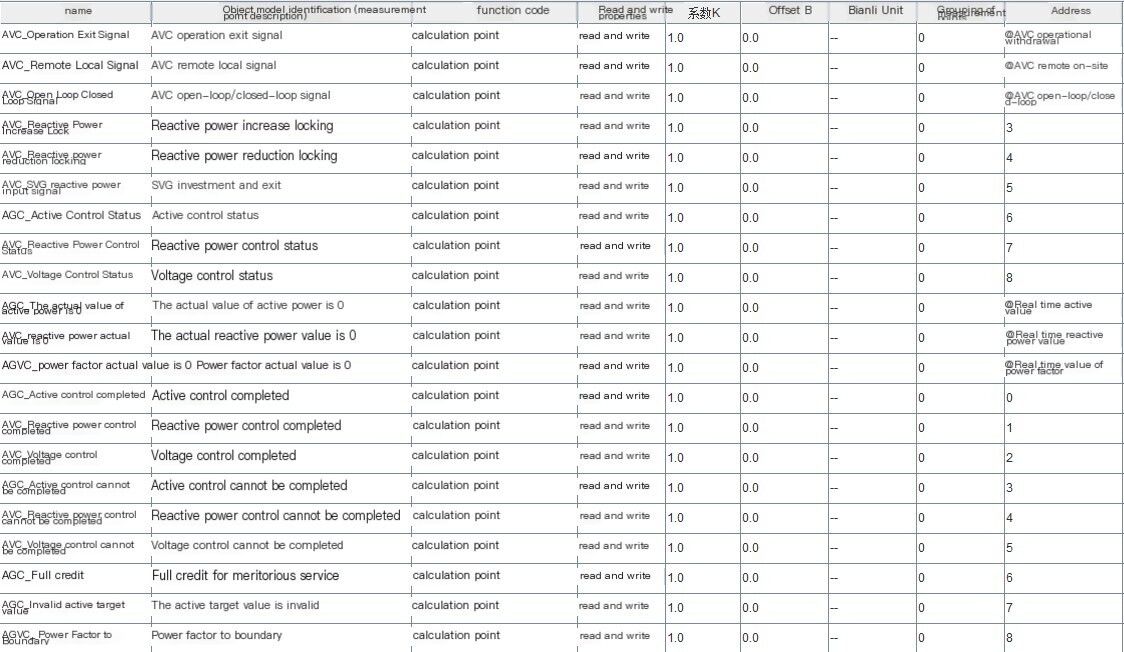
Image AGC/AVC remote signaling point

Image AGC/AVC remote control point
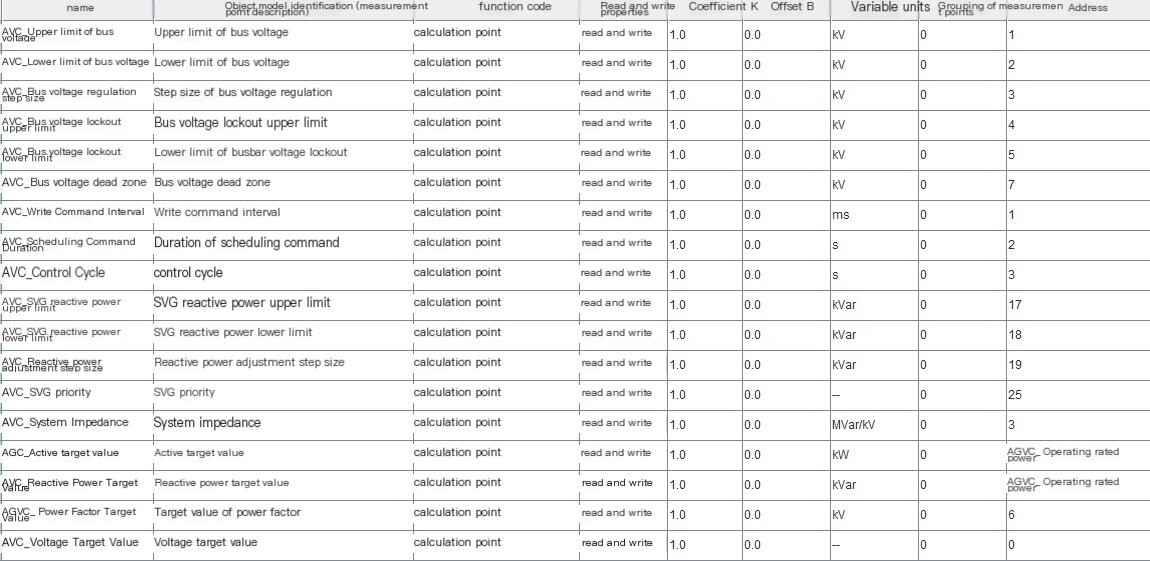
Image AGC/AVC remote adjustment point
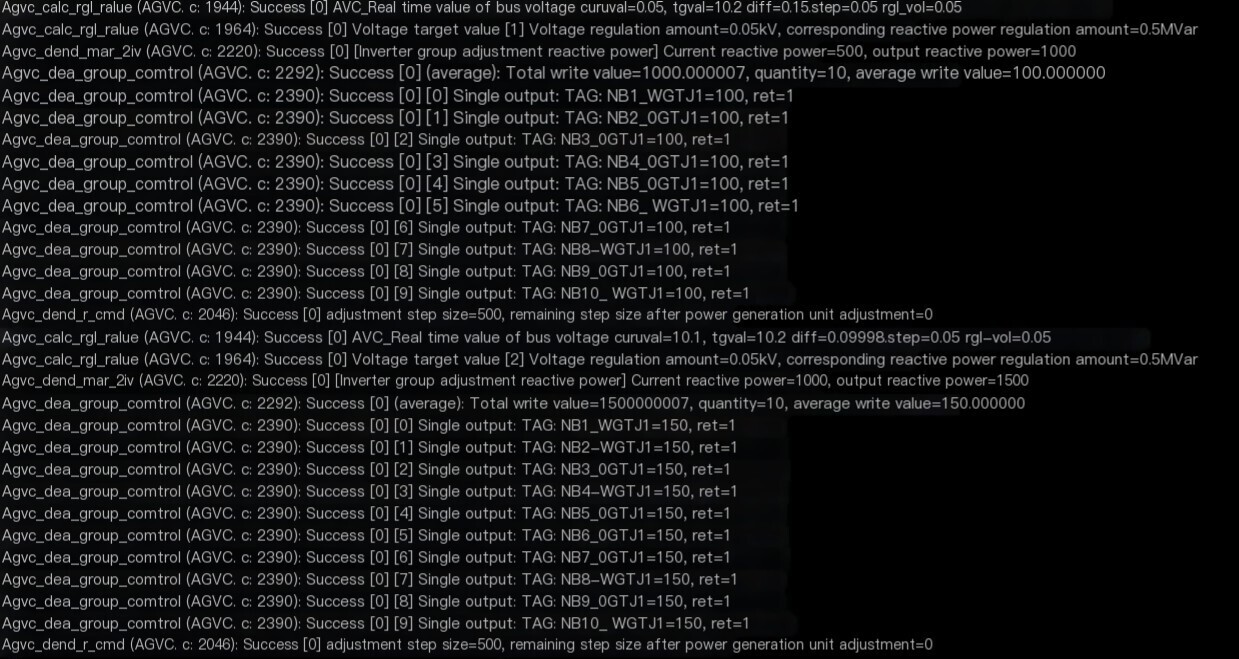
Multi in One 5G Fusion Terminal Responds to Main Station AGC/AVC Control
4.6 5G high-speed communication
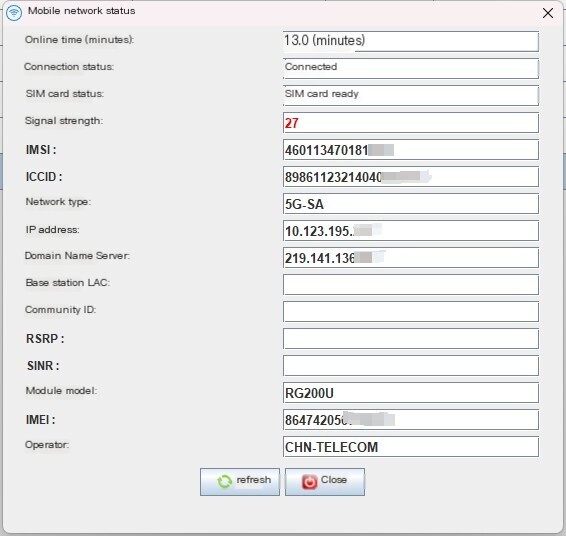
The multi in one 5G fusion terminal supports the latest generation of mobile communication technology, 5G communication, and reliable, efficient, stable, and low latency data communication. It can maintain high-speed communication with the main station and control response within 50ms.
Image: 5G module dial-up
4.7 List of Protocol Libraries
Multi in one 5G fusion terminal running the core software platform of LPC Data Acquisition (abbreviated as LPC software). Each communication Protocol is an independent SO library in the LPC software. When the device is started, the LPC software reads the configured project and dynamically loads the required SO library based on the configured project. When developing a new communication Protocol or extending an existing communication Protocol, it does not affect the stability of other communications Protocol in the original system.
At present, the main protocols supported by multi in one 5G fusion terminals are:
- MODBUS RTU/TCP master and slave stations;
- CDT master and slave stations;
- IEC101 station, slave station;
- IEC103 serial port/network master station;
- IEC104 master and slave stations;
- IEC61850 Server and Client
- Electricity meters DL645-1997, DL645-2007, DLT698.45 Protocol;
- South Self Ethernet 103 master and slave stations;
- NARI Ethernet/serial port 103;
- Jinzhi Ethernet 103;
- Xuji serial port 103, Ethernet 103, 104;
- Tomorrow's Ethernet 103;
- Four party protection for CSC2000 clients and servers
- State Grid Cloud (PV) Poverty Alleviation Power Station
- Alibaba Cloud IoT/Graffiti Intelligence/Unicom/Amazon/RootCloud 3.0/RootCloud 4.0/Sany Heavy Industry/Chint IoT/Dianxiang/Instruction Set/Guangyuan/Dingkong/Sanshui Intelligence/Jinghe/Fangzhu and other IoT and MQTT platforms;
- New energy inverters of various types, meteorological stations Protocol, etc.
5 Hardware interface
5.1 Technical Parameters
5.1.1 Hardware parameter
| name | parameter |
|---|---|
| CPU | Cortext-A8 CPU 800MHz |
| system memory | 512MB |
| storage | 8GB eMMc |
| Ethernet | 2 external remote control network ports (2 built-in), 1 encrypted console port, 1 encrypted internal network port |
| serial port | 8-way RS485/232 interface |
| wireless | 5G full network |
| encryption | 1 built-in micro vertical authentication module |
| USB | 1 USB 2.0 |
| operating system | Embedded LINUX system, version 4.1 and above |
| Installation method and size | Standard 1U rack mounted, 19 inches 440mm × 240mm × 44.5mm |
| Power supply | AC communication: 85V~264V; DC: 100V~300V, power consumption<15W, optional dual power supply |
| power protection | Equipped with surge protection, anti reverse connection, anti overcurrent, and overvoltage input |
| Operating Temperature | -40℃~75℃ |
| Storage temperature | -40℃~85℃ |
| Ambient Humidity | 5% -90% RH (non condensing) |
| seismic resistance | 10-25 Hz (2G/30 minutes in X, Y, Z directions) |
| cooling method | Fanless, naturally air-cooled |
| Other | Equipped with independent Hardware watchdog and GPIO control functions; The whole machine has no rotating equipment. |
5.2 Product size and appearance
5.2.1 Product Dimensions
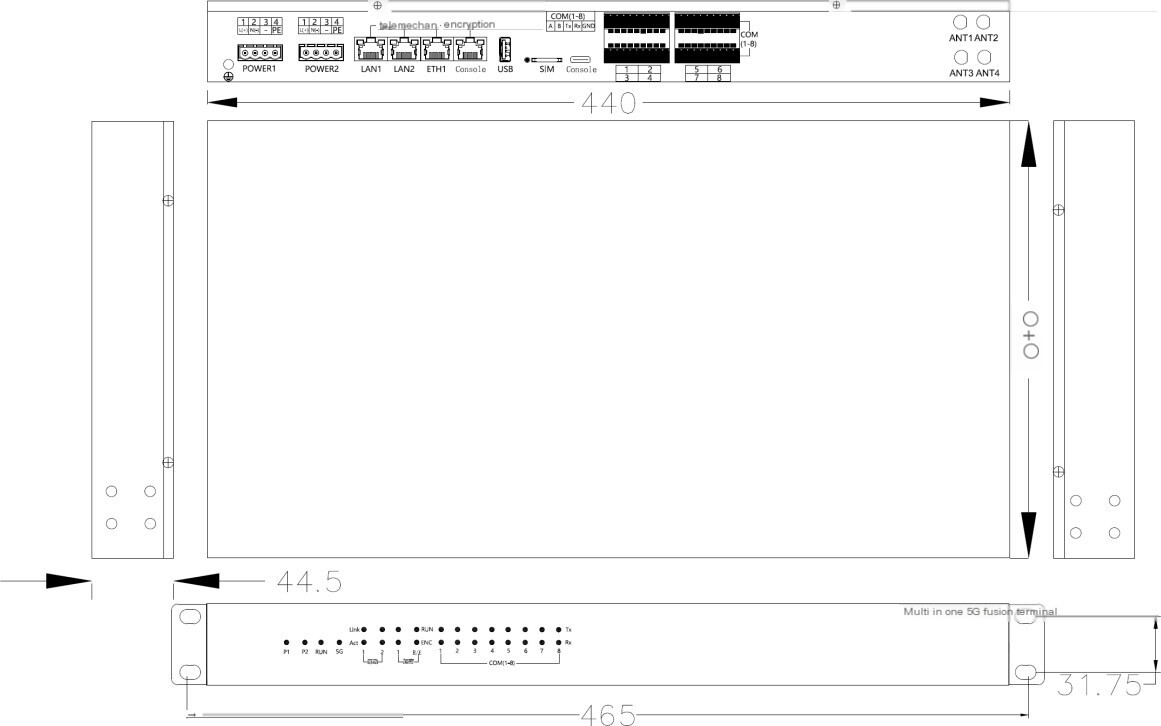
Product dimension diagram

Front view of the box body
| serial number | screen printing | description | Remark |
|---|---|---|---|
| 1 | P1 | Power supply 1 indicator light, constantly on with electricity | |
| P2 | Power supply 2 indicator light, constantly on with electricity | ||
| RUN | Running light, flashing once every second is normal, otherwise abnormal | ||
| 5G | 5G indicator light, on for 800ms, off for 200ms, already connected to the network, flashing with data packet sent | ||
| 2 | LAN1 | Ethernet 1 indicator light, Link constantly on, Act flashing | Ethernet indicator light |
| LAN2 | Ethernet 2 indicator light, Link constantly on, Act flashing | ||
| LAN3 | Ethernet 3 indicator light, Link constantly on, Act flashing | ||
| LAN4 | Ethernet 4 indicator light, Link constantly on, Act flashing | ||
| 3 | TX1/RX1 | COM1 indicator light, TX indicates transmit, RX indicates receive | Serial port indicator light |
| TX2/RX2 | COM2 indicator light, TX indicates transmit, RX indicates receive | ||
| TX3/RX3 | COM3 indicator light, TX indicates transmit, RX indicates receive | ||
| TX4/RX4 | COM4 indicator light, TX indicates transmit, RX indicates receive | ||
| TX5/RX5 | COM5 indicator light, TX indicates transmit, RX indicates receive | ||
| TX6/RX6 | COM6 indicator light, TX indicates transmit, RX indicates receive | ||
| TX7/RX7 | COM7 indicator light, TX indicates transmit, RX indicates receive | ||
| TX8/RX8 | COM8 indicator light, TX indicates transmit, RX indicates receive |

Back view of the box body
5.2.2 Power interface
The power input is shared between AC and DC, with an AC input range of 85-264V and a DC input range of 100-370V
| Identifier | Functional Description |
|---|---|
| 1 | AC L, DC positive pole |
| 2 | AC N, DC negative pole |
| 3 | empty |
| 4 | grounding |
5.2.3 Definition of Serial Port and SIM Card Interface
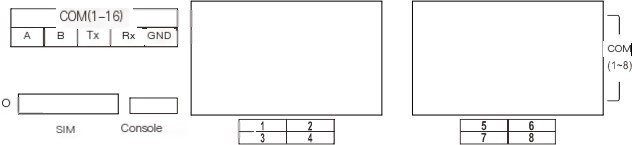
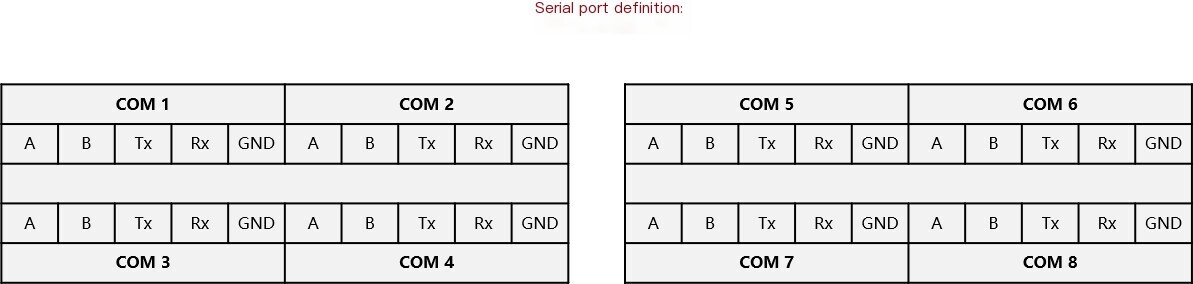
The wiring sequence of the Nth serial port:
| number | Identifier | Functional Description |
|---|---|---|
| 1 | A | The nth channel RS485 port A (n=1~8) |
| 2 | B | The nth channel RS485 port B (n=1~8) |
| 3 | Tx | The nth channel RS232 port Tx (n=1~8) |
| 4 | Rx | The nth channel RS232 port Rx (n=1~8) |
| 5 | GND | The nth channel RS232 port GND (n=1~8) |
The arrangement order of serial ports (1-8):
| Identifier | Functional Description |
|---|---|
| n | 8 |
Note: Each serial port can communicate with either RS485 or RS232.
Console is a debugging serial port/RS232/Type-C interface form for 5G converged terminals. SIM: It is the entry point for scheduling 5G APN dedicated network card insertion.
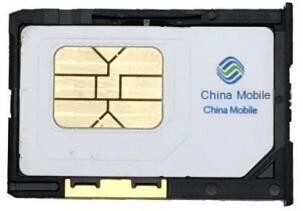
The supported SIM card types are: standard SIM card 25mm * 15mm (mini SIM card). Users need to use a top pin to push the SIM card slot and the card removal handle on the edge to remove the card. After exiting the SIM card holder, insert the standard SIM card into the holder as shown below (be sure to press the SIM card into place when inserting it into the holder). Then drag the SIM card with it along the SIM card slot guide and insert it into the machine, and insert it securely in place.
(Note: SIM card insertion and removal requires power-off operation and does not support live insertion and removal of SIM cards)
5.2.4 Network Interface
| classification | Identifier | Functional Description |
|---|---|---|
| telemechanics | LAN1 | Remote control network port, 192.168.11.177 |
| LAN2 | Remote control network port, 192.168.12.177 | |
| encryption | ETH1 | Encrypt internal network port, 169.254.200.200 |
| Console | Encrypt console port |
6 Typical Networking Types
6.1 Power dispatch communication network
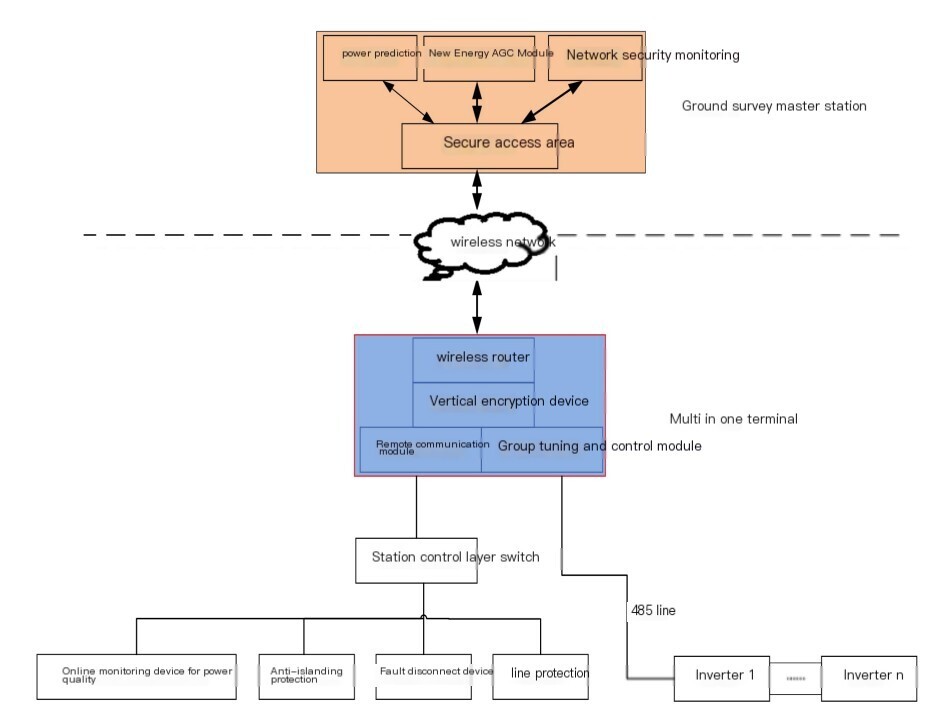
Figure Power Dispatch Communication Network
Through 5G CPE communication, the station end adopts a multi machine integrated acquisition communication device, which also has wireless/wired communication, encryption chip, remote transmission, AGC substation and other functions. The inverter signal ofPVcommunicates with the multi machine integrated 5G fusion terminal through a trusted WLAN network, power carrier network or 485 wired network.
After collecting station information, the 5G integrated communication terminal communicates with the dispatch master station via wireless network in the wireless security access area, using the DL/T634.5104 protocol for communication.
When conducting data communication in the power monitoring system through 5G wireless/wired communication, the vertical communication channel adopts access control, authentication, and encryption measures. At the same time, it can receive and automatically execute instructions issued by the AGC master station to adjust the output power of the inverter.
7 Product Installation
7.1 Pre installation inspection
Check the outer packaging:
Before opening the outer packaging of the multi in one 5G fusion terminal, please check for any visible damage, such as holes, cracks, or other signs of internal damage. If there are any packaging abnormalities, please do not open and contact your distributor as soon as possible.
Check the random accessories:
After unpacking the outer packaging of the multi in one 5G fusion terminal, please check if the delivery is complete and if there are any obvious external damages. If there is any damage or missing items, please contact the manufacturer.
Instructions:
Please refer to the 'Product Packing List' inside the packaging box for the quantity of delivered items that come with the box.
7.2 Preparation of installation tools
| tool | model | purpose |
|---|---|---|
| impact drill | Configure drill bit with a diameter of 6mm and a diameter of 8mm | When using wall mounted installation, it is used for wall drilling. |
| Diagonal cutting pliers | - | Used for cutting communication cables or cable ties. |
| Wire stripper | - | Used to peel off the cable skin. |
| Crystal head crimping pliers | - | Used for pressing RJ45 network crystal heads. |
| flat-head screwdriver | 1.5x100 3 x100 | Used for connecting communication cable screws. |
| Phillips screwdriver | 6 x 100 | Used for connecting communication cable screws. |
| Cable tie | - | Tie the cable. |
7.3 Choose the installation location of the equipment
- When choosing the installation location, please consider the following requirements:
- The protection level of the multi in one 5G fusion terminal is IP20. Do not install the multi in one 5G fusion terminal outdoors.
- Do not place the multi in one 5G fusion terminal in an environment that is prone to water or moisture, in order to avoid damage to the multi in one 5G fusion terminal.
- The ambient temperature should be maintained between -40 º C and+75 º C.
- Ensure that the communication distance of RS485 does not exceed 1000m and the communication distance of Ethernet does not exceed 100m.
- It is recommended to install a multi in one 5G fusion terminal at an appropriate height for easy operation and maintenance.
- A certain installation distance should be maintained between the multi in one 5G fusion terminal and surrounding objects.
7.4 Installation of Multi in One 5G Fusion Terminal Method
7.4.1 Standard guide rail installation method
- Good grounding of the rack is an important guarantee for equipment anti-static, leakage prevention, lightning protection, and interference prevention, therefore ensuring the correct installation of the rack grounding wire;
- Equipment installed in the rack is generally installed from bottom to top to avoid overloading installation;
- Avoid placing other heavy objects on the surface of the multi in one 5G fusion terminal to prevent accidents;
- Ensure heat dissipation and air circulation inside the rack;
The multi in one 5G fusion terminal is installed on a 19 inch standard rack.
Operation Steps
Step 1: Install the two L-shaped brackets in the accessories on the left and right sides of the multi in one 5G fusion terminal, and fix them with the screws provided in the accessories;
Step 2: Place the multi in one 5G fusion terminal in an appropriate position within the rack, preferably supported by a bracket;
Step 3: Use rack screws to secure the L-shaped bracket to the guide slots fixed at both ends of the rack, ensuring that the equipment is installed smoothly on the rack.
Step 4: Use a screwdriver to tighten the frame screws and confirm that they are not loose.
8 Electrical Connections
Application Overview:
This section mainly introduces the specific operation of the electrical connection between the multi in one 5G fusion terminal and equipment such as inverters, combiner boxes, power quality meters, environmental monitoring devices, and electricity meters.
Instructions:
When the multi in one 5G fusion terminal is connected using RS485 communication line, the cable can be connected to the RS485 (1) - RS485 (8) terminal block.
When the multi in one 5G fusion terminal is connected by Ethernet cable, the cable can be connected to 4 network ports. For detailed port instructions, please refer to the front of the box in the appearance description.
Note:
When making electrical connections, please ensure that all cables are reliably connected to prevent loosening.
Before completing the electrical connection of the multi in one 5G fusion terminal, please do not connect the power adapter or turn on the power.
8.1 Connection Port Description
Port Description:
The schematic diagram of the bottom of the box of the multi in one 5G fusion terminal, as well as the port function description, please refer to the interface at the bottom of the box in the appearance description, as shown in the following figure.

The multi in one 5G fusion terminal has a total of 8 RS485/232 channels.
Port Description Diagram
Instructions for connecting devices:
When a multi in one 5G fusion terminal supports connecting multiple devices through a serial port, the connection method is shown in the following figure. For specific wiring methods for different devices, please refer to the communication line wiring instructions for the other end device.
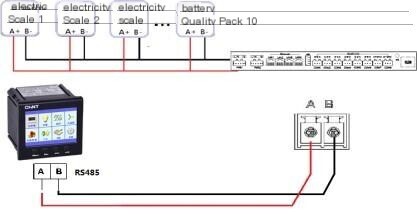
Note:
Multi in one 5G fusion terminal connects devices through serial port (it is recommended that the number of devices connected to a single serial port should not exceed 32)
8.2 Connecting the protective grounding wire
Application Overview: By connecting the grounding wire, the shell grounding terminal of the multi in one 5G fusion terminal is connected to the on-site grounding bar to achieve grounding protection and effectively protect the equipment;
Operation steps:
Step 1: Connect one end of the prepared grounding cable (4m2-6m2) to the on-site grounding busbar;
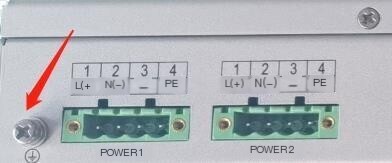
Step 2: Connect the other end to the grounding terminal of the multi in one 5G fusion terminal housing, as shown in the following figure.
Grounding diagram
Instructions:
When connecting the grounding cable, ensure that the two ends are firmly connected and not easily detached;


评论
发表评论