Mining sand, gravel, aggregate, coal, cement, port conveyor belt foreign object detection AI visual recognition dedicated software system - Data mining IoT - Real-time monitoring alarm linkage control
As a professional provider of IoT data acquisition solutions and an expert in industrial IoT data acquisition, the editor of Shanghai Data Acquisition IOT Technology Co., Ltd, (daq-iot) hereby presents the following introduction, and sincerely welcomes discussions and exchanges. Supported Communication Interfaces: CAN, RS485, Mbus, 4–20mA, Profibus, CC-Link, HART, digital I/O, etc. Industrial Protocols: Modbus RTU/TCP, HJ212, IEC104, DLT645, DLMS, IEC61850, MQTT, etc. Mail:export@daq-iot.com
As a professional provider ofIoT,Data Acquisition, andsolution,Industry IoTData Acquisition expert (professional account), Shanghai DAQ-IoT website editor daq iot, would like to introduce the following content here and sincerely welcome everyone to discuss and exchange ideas. Can handle the following common communication interfaces: CAN/RS485/Bus/4~20mA/Profibus/CC Link/HART/IO switch values and other industrialProtocol:
Modbus RTU TCP/HJ212/IEC104/DLT645/DLMS/IEC61850/MQTT, etc
As a professional provider of IoT data acquisition solutions and an expert in industrial IoT data acquisition, the editor of Shanghai Data Acquisition IoT (daq-iot) hereby presents the following introduction, and sincerely welcomes discussions and exchanges.
Supported Communication Interfaces: CAN, RS485, Mbus, 4–20mA, Profibus, CC-Link, HART, digital I/O, etc.
Industrial Protocols: Modbus RTU/TCP, HJ212, IEC104, DLT645, DLMS, IEC61850, MQTT, etc.
1、 Document Overview
1.1 Document Purpose
This document provides a detailed description of the technology developed by Shanghai DAQ-IoT, a technology companyConveyor belt foreign object detection AI visual recognition dedicated system, corresponding software functions, operational logic, performance indicators, and operational requirements, for system useO&M、 Secondary development provides standardized reference basis.
1.2 Scope of Application
This software is suitable for belt conveyor systems in industrial scenarios such as mines, sand and gravel aggregates, coal, cement, ports, etc. It aims to detect foreign objects and abnormal working conditions in the material conveying process, and achieve Real-time detection, intelligent alarm, and linkage control based on image recognition technology.
1.3 Definition of Terms
ROI region of interest: a custom defined area on the conveyor belt screen in the software that requires AI detection, used to mask invalid areas and reduce computing power consumption.
AI reasoning: Based on theDeep Learningalgorithm model, analyze theReal-timevideo frames to complete the calculation process of foreign object recognition, classification, and localization.
Event tracing: The function of retrieving and replaying on-site footage, video clips, and log information of historical alarm events.
2、 Overall Overview of Software
This software is an industrial grade intelligent detection system developed based on machine vision and theReal-timeAI algorithm. It is designed for conveyor belt operation scenarios and uses an industrial camera to capture conveying images. Using image recognition technology, it identifies and accurately locates foreign objects and abnormal working conditions in materials, synchronously triggers graded alarms and equipment linkage, replaces traditional manual inspections, solves the pain points of low efficiency, delayed response, and high missed detection rates, and comprehensively improves the safety production level and automation control capabilities of industrial conveying links.
3、 Core functional modules of the system
table
Core positioning of functional modules
TheDevice Managementmodule is responsible for the access, connection, status monitoring, and resource management of industrial cameras and other capture devices
The video stream capture preview module is responsible for pulling, decoding, Real-time display, and basic control of the video stream
The core module of AI vision detection is responsible for intelligent recognition, classification, and positioning of foreign objects and abnormal working conditions on the conveyor belt
The alarm and linkage module is responsible for the Real-time alarm, hierarchical control, and downstream equipment linkage of abnormal events
The data storage and tracing module is responsible for the storage, retrieval, and tracing management of alarm events, videos, and logs
The system configuration and management module is responsible for configuring user permissions, algorithm models, system parameters, and full lifecycle management
4、 Detailed Function Description
4.1 Device Management Function
Device access management: Supports the access of mainstream industrial cameras such as USB, GigE, RTSP Protocol network cameras, supports automatic device enumeration, manual configuration of IP/port/account information, and is compatible with multiple brands of industrial camera drivers.
Device start stop control: Provides visual one click operation buttons, supports core operations of "open device" and "close device", completes device initialization connection and resource release, and adapts to batch start stop control of multiple cameras.
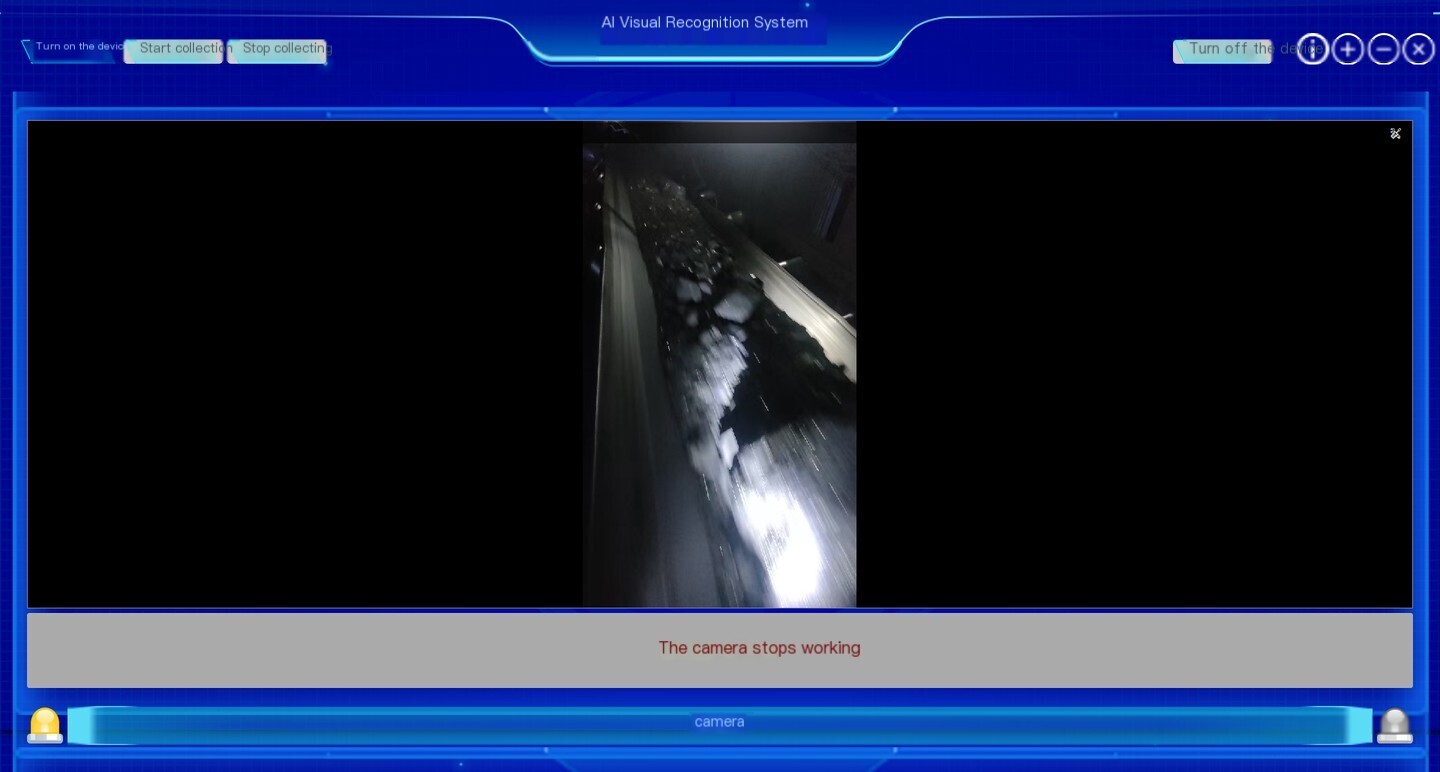
Device status monitoring: Real-time monitors the camera connection status, operation status, and signal status, and provides status prompts in a fixed area of the interface (such as the "Camera Stop Working" status prompt in the reference figure). It supports abnormal status recognition and prompts for device offline, signal loss, and Hardware faults.
4.2 Video stream capture and preview function
Collection start stop control: Provide "start collection" and "stop collection" operation buttons. After the device is successfully connected, it can start/stop video stream pulling, decoding, and screen refreshing with one click. Collection start stop is linked with AI detection inference start stop.
Preview function ofReal-time: The core area of the main interface is the video preview window, which displays high-definition images of the conveyor belt running. It supports adaptive frame rates of 1-30pps and is compatible with mainstream resolutions such as 1080P/2K/4K.
Screen control function: supports one click zoom in/out of the screen, full screen display, custom drawing of ROI regions of interest, can only perform detection on the effective conveying area of the conveyor belt, block irrelevant screen areas, and improve detection efficiency.
Multi channel switching: Supports simultaneous access of multiple cameras, allowing for quick switching of conveyor belt camera images at different points on the interface, achieving centralized control of multiple conveyor lines.
4.3 Core functions of AI visual recognition and foreign object detection
Core foreign object detection capability: based on Deep LearningConvolution Neural NetworkAlgorithms can accurately identify various types of foreign objects mixed in conveyor belt materials, including but not limited to anchor rods, steel plates, angle irons, drill rods, wood, large pieces of gangue/ore, construction tools, metal parts and other non-standard materials, supporting precise classification and positioning of foreign objects.
Extended working condition detection capability: It can be extended to support the identification and detection of common abnormal working conditions such as conveyor belt tearing, belt deviation, material accumulation, and belt slippage, covering all risks in the conveying process.
Real-time Reasoning analysis: Supports frame by frame analysis of video streams, with a single frame detection response time of ≤ 200ms, achieving recognition and localization of foreign objects without significant delay.
Algorithm parameter configuration: supports custom adjustment of detection confidence threshold, and can set the recognition accuracy threshold for alarm triggering according to on-site working conditions; Support online import, update, and version management of algorithm models, adapting to the detection needs of different materials and scenarios.
Multi object parallel detection: supports simultaneous recognition and annotation of multiple foreign objects and types of anomalies within a single screen. After detecting the target, Real-time highlights the location, category, and confidence information of the foreign object through a rectangular box in the preview screen.
4.4 Abnormal alarm and linkage function
Multi mode Real-time alarm: After detecting foreign objects/abnormal working conditions, the alarm is immediately triggered. It supports interface pop-up alarm, screen highlight annotation, sound and light alarm prompt, status bar text alarm and other multi-mode alarms to ensure that operators perceive risks in a timely manner.
Hierarchical alarm management: supports hierarchical control of alarm events, which can be classified into general, severe, and emergency levels based on the size, category, and risk level of foreign objects. Different levels correspond to different alarm strategies and linkage rules.
Equipment linkage control: The data acquisition IoT technology provides standard industrial interfaces and supports integration with PLC and DCS systems. It can automatically trigger linkage actions such as conveyor belt deceleration, emergency stop, and sound and light alarm activation based on alarm levels, achieving closed-loop risk management.
Alarm information push: Supports the push of alarm event Real-time information, which can synchronize alarm time, location, foreign object category, on-site screen and other information to the central control system and mobile platform, achieving remote control.
4.5 Data Storage and Traceability Function
Automatic storage management: When an alarm event is triggered, the video clips before and after the event, on-site captured images, and full dimensional information of the event (time, camera number, foreign object category, confidence, processing status) are automatically synchronized and stored. It supports custom configuration of storage duration to meet the traceability requirements of industrial scenes.
Event retrieval and backtracking: Supports searching historical alarm events based on multi-dimensional conditions such as time range, camera location, event type, and processing status. It allows for one click playback of video clips corresponding to events, viewing captured images, and fully restoring the event scene.
Data export management: Supports exporting alarm event logs and statistical reports in Excel format, as well as exporting alarm videos and images locally to meet the needs of ledger management and security auditing.
Statistical analysis function: Support automatic statistics of alarm events, generate statistical reports by time, location, and foreign object type, visually display the risk distribution pattern of the conveying process, and assist in optimizing on-site production management.
4.6 System management and configuration functions
User permission management: Supports a three-level user permission system (administrator, operator, visitor), with different roles assigned different operational permissions. Administrators can configure the full system parameters, operators can only perform device start stop and alarm handling, and visitors can only view screens and events to ensure system operation security.
Parameter configuration management: supports visual configuration of camera parameters (resolution, frame rate, exposure, focus), algorithm parameters, alarm rules, linkage strategies, and storage parameters, which can be adapted to on-site working conditions without modifying code.
Log full lifecycle Management: Automatically records system operation logs, user operation logs, device status logs, and alarm event logs. All logs are tamper proof and support full cycle traceability and export.
System maintenance function: supports one click system restart, batch device reset, algorithm model hot update, fault self check and diagnosis function, reducing the difficulty of on-site O&M.
5、 Technical performance indicators
table
Performance parameters of indicator items
Foreign object detection and recognition accuracy ≥ 99%
Single frame detection response time ≤ 200ms
Minimum foreign object detection size ≥ 5mm (adjustable according to camera resolution)
Support video frame rate adjustable from 1-30pps
The maximum number of cameras supported by a single device is 16 for synchronous detection
The average time between system failures is ≥ 10000 hours
Alarm linkage response delay ≤ 500ms
6、 Operating environment requirements
6.1 Hardware Environment
Main control device: Shanghai DAQ-IoT Network Technology Industrial Computer, CPU≥Intel Core i5, Memory ≥ 8GB, hard drive ≥ 1TB SSD
Computing power unit: NVIDIA discrete graphics card, graphics memory ≥ 4GB, supports CUDA acceleration
Acquisition device: Industrial camera compatible with GigE/USB/RTSP Protocol, compatible with corresponding drivers
Peripherals: Sound and light alarm, supporting standard MQTT/Modbus/TCP Protocol PLC Controller(Adaptation of linkage function)
6.2 Software Environment
Operating System: Windows 10/11 64 bit Professional/Enterprise Edition
Operating environment: NET Framework 4.7.2 and above, corresponding camera driver, CUDA runtime library
Network environment: LAN bandwidth ≥ 1000Mbps, ensuring stable transmission of network camera video streams
7、 Main interface operation instructions (corresponding to reference interface)
Top functional button area: The core operation buttons are located in the upper left corner of the interface. From left to right, they are "Open Device," "Start Collection," "Stop Collection," and "Close Device," completing the full process control of the device and collection; The upper right corner is the auxiliary function button, which includes the "Close Device" shortcut button, system information button, screen zoom button, and window close button.
Video Preview Area: The central part of the interface is the core video preview window, where Real-time displays the footage captured by the conveyor belt camera. When a foreign object is detected, the target position and information are automatically marked on the screen.
Status prompt area: Below the preview window is a fixed status prompt bar, with red font Real-time displaying the core operating status of the device, such as key information such as "camera stopped working", "device running normally", "foreign object detected triggering alarm", etc.
Bottom device identification area: The camera name/number corresponding to the current preview screen is marked at the bottom of the interface, supporting quick switching between multiple cameras and achieving centralized control at multiple locations.


评论
发表评论